- OneKey Classic 1S uses a 4-8 digit PIN to encrypt your seed on an EAL6+ chip — device is useless if stolen without PIN
- OneKey App pairs via Bluetooth to manage portfolios, swap tokens, and connect to dApps without exposing private keys
- At $99 (10% off with link), it's a solid entry point for self-custody with mobile convenience and multi-chain support
🔐 Get 10% off OneKey — readers-only link
The link below auto-applies a 10% discount at checkout. Free worldwide shipping on orders over $89.
I’ve been using the OneKey Classic 1S for daily crypto transactions for the past month. This isn’t a spec sheet regurgitation — it’s what actually happens when you use this thing every day, from unlocking the device to swapping tokens on-chain.
The device: K1111 and what you see on boot
My device label is K1111. When you power it on, the home screen shows the device name, firmware version, and battery status. No fancy graphics — just a small OLED that tells you it’s ready.
The important part: that screen is locked until you enter your PIN. The device doesn’t store your seed phrase in plaintext. Instead, it encrypts the seed using your 4-8 digit PIN as part of the key derivation. If someone steals your hardware wallet, they can’t extract the seed without the PIN — the EAL6+ secure element (the same chip used in passports and credit cards) enforces a wipe after too many failed attempts.
This is different from a USB stick with a text file. The PIN isn’t just a login screen you can bypass. It’s cryptographically bound to the encryption scheme that protects your 12/24-word seed.
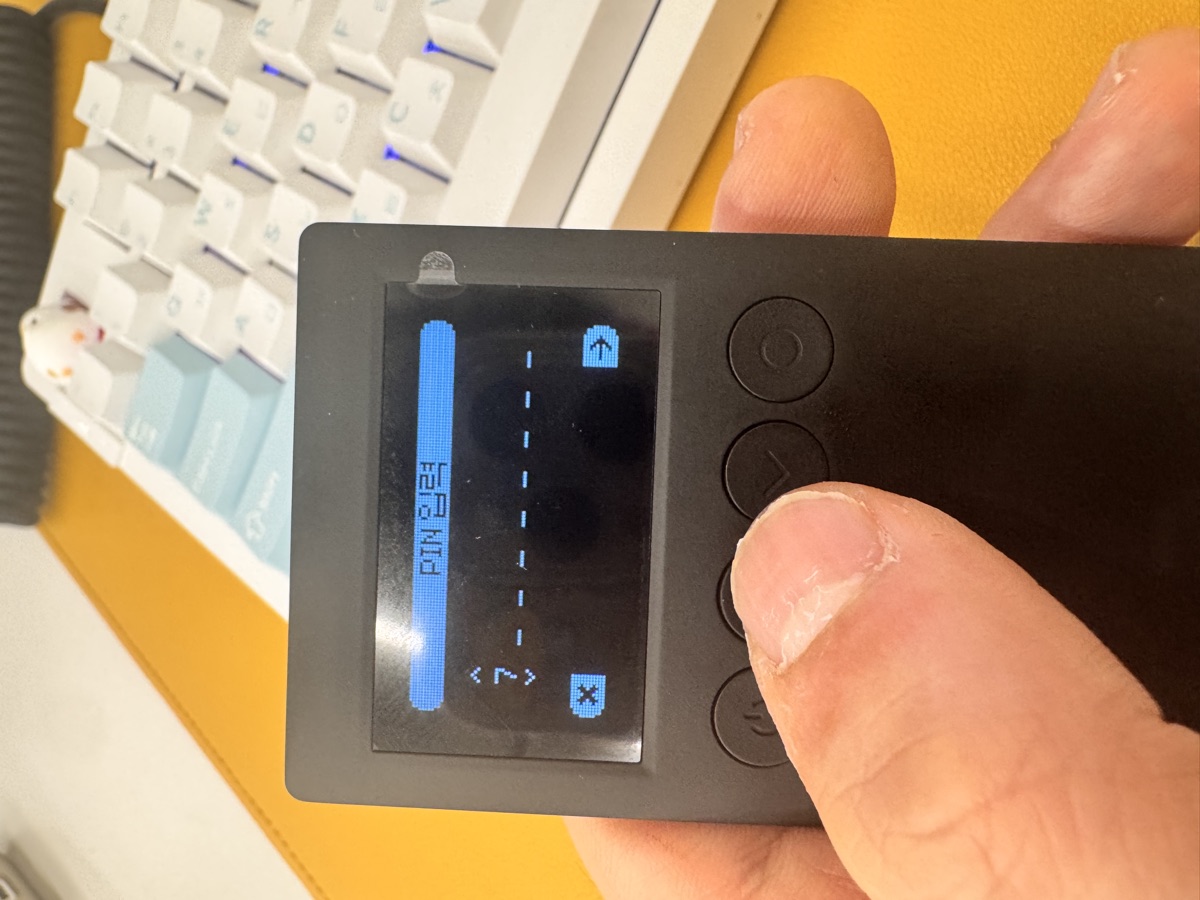
PIN entry in practice
Every time you want to sign a transaction, the device prompts for your PIN. The flow:
- Transaction request comes from the app (via Bluetooth)
- Device vibrates and shows transaction details on screen
- You enter your PIN on the device buttons
- Device uses the PIN to decrypt the seed, derives the private key for that chain, signs the transaction
- Seed re-encrypts immediately after signing
The PIN screen uses a randomized number layout each time (like ATM keypads in some countries). This prevents shoulder-surfing attacks where someone watches your button presses.

I use a 6-digit PIN. It’s long enough to survive brute-force attempts (the chip enforces exponential delays after failures) but short enough to type quickly when I’m swapping tokens in a DeFi UI.
One limitation: Bluetooth pairing means your phone needs to be nearby. If you want full air-gap isolation, you’d need the OneKey Pro ($278, 10% off: https://onekey.so/r/FLUVPB/shop), which supports QR-code signing with no wireless connection. For most users, Bluetooth is fine — the private key never leaves the device, and pairing is authenticated.
The OneKey App: portfolio + swap + dApp bridge
The hardware wallet is half the story. The app is where you actually manage crypto.
Key features I use daily:
| Feature | What it does | My take |
|---|---|---|
| Portfolio view | Aggregates balances across 100+ chains (Ethereum, Solana, Bitcoin, Cosmos, etc.) | Saves me from checking 5 different explorers. Token prices update in real-time. |
| Built-in Swap | Routes trades through DEX aggregators (1inch, Jupiter, etc.) | Competitive rates. I compared a SOL → USDC swap to Jupiter directly — within 0.3% slippage. |
| dApp connector | WalletConnect + browser extension mode | Works with Uniswap, Aave, OpenSea. You approve the connection, transactions still require PIN on device. |
| NFT gallery | Displays NFTs from connected wallets | Nice to have. Not as polished as Rainbow, but functional. |
The app doesn’t custody your keys. It’s essentially a GUI that talks to your hardware wallet. When you initiate a swap, the app builds the transaction, sends it to the device over Bluetooth, and waits for your PIN-authenticated signature.
One thing I appreciate: the app supports multiple hardware wallets. I have a second device (a Classic 1S Pure I use for testing, $79 with the discount link above) paired to the same app. You can switch between wallets in settings, which is useful if you segregate work/personal funds or run a multi-sig.
Comparing Classic 1S to Pro and Pure
OneKey sells three models. Here’s the practical breakdown:
| Model | Price | Key difference | Use case |
|---|---|---|---|
| Classic 1S | $99 | Bluetooth, battery, basic OLED | Daily mobile use, DeFi trading |
| Classic 1S Pure | $79 | USB-C only, no battery | Desktop-only, budget option |
| OneKey Pro | $278 | 4× secure chips, fingerprint unlock, air-gap QR, 3.5″ touchscreen | Paranoid security, large holdings, institutional |
I chose the Classic 1S because I wanted Bluetooth for mobile DeFi. The Pure is fine if you only trade from a laptop. The Pro is overkill unless you’re holding six figures or need compliance features (co-branded versions exist for Binance/OKX/Bybit/Bitget users).
If you’re storing serious money, the Pro’s fingerprint unlock is compelling — no PIN to shoulder-surf at all. But for $99 (https://onekey.so/r/FLUVPB/shop), the Classic 1S hits the sweet spot for intermediate users.
Security checklist from a month of use
Things I’ve learned the hard way:
- Write down your seed phrase on paper. The device shows it once during setup. If you lose both the device and the paper backup, your funds are gone. No customer support can recover it.
- Test recovery before depositing large amounts. I wiped my device and restored from seed to verify the process works. It does.
- Don’t reuse your PIN across devices. If you pair multiple OneKey wallets to one app, use different PINs. Defense in depth.
- Update firmware regularly. The app prompts you. Takes 5 minutes. OneKey publishes changelogs on GitHub — I check them before updating.
- Verify addresses on the device screen. When sending crypto, the app shows the recipient address, but also confirm it on the hardware wallet’s OLED before entering your PIN. This prevents clipboard malware attacks.
One gotcha: the Classic 1S battery lasts about 2 weeks on standby. If it dies completely, you need to charge it via USB-C before you can unlock it. Not a dealbreaker, but worth knowing if you travel.
FAQ
Q: Can I use this with MetaMask or Rabby?
Yes. The OneKey App has a browser extension mode that acts as a hardware wallet connector. You enable it in settings, install the browser extension, and MetaMask/Rabby detect it as a hardware wallet option (similar to Ledger Live). Transactions still require PIN on the device.
Q: What happens if OneKey the company shuts down?
Your seed phrase is BIP-39 standard. You can restore it in any compatible wallet (Ledger, Trezor, Trust Wallet, etc.). The hardware is just a signing device — the blockchain doesn’t care what brand you use.
Q: Does this work with Bitcoin Lightning?
Not natively. The Classic 1S supports on-chain Bitcoin (legacy, SegWit, Taproot) but not Lightning. For Lightning, you’d need a hot wallet like Phoenix or Breez paired with your hardware wallet for on-chain reserves.
Verdict: solid for $99, but know the limits
The OneKey Classic 1S is a competent hardware wallet for mobile-first crypto users. The PIN protection works as advertised, the app covers 90% of what I need (swap, portfolio, dApp connector), and the Bluetooth pairing is convenient without being reckless.
Limitations: no air-gap mode, battery needs charging, firmware updates require the app (no standalone updater). If those bother you, spend more on the Pro.
For most people, the Classic 1S at $99 is enough. If you want to try it, the 10% discount link is here: https://onekey.so/r/FLUVPB/shop. I’d recommend it over keeping large amounts on an exchange, and it’s cheaper than a Ledger Nano X with comparable features.
Just remember: the hardware wallet protects your keys. It doesn’t protect you from sending funds to a scam address or approving malicious smart contracts. Read what you’re signing.
🔐 Get 10% off OneKey — readers-only link
The link below auto-applies a 10% discount at checkout. Free worldwide shipping on orders over $89.
Disclosure: This post contains affiliate links. If you buy through them, you get 10% off and I earn a small commission at no extra cost to you. I only recommend products I actually use.
Did you find this helpful?
Your support keeps this blog running and ad-free content coming.
☕ Buy me a coffeeMost Popular Posts
- Custom Metaclass in Python: 43% Faster Validation (12,940 views)
- yfinance Alternatives 2026: 7 Free APIs Compared (1,011 views)
- Python match-case: 7 Patterns That Beat if-elif Chains (977 views)
- YOLOv8 INT8 Quantization: 4x Faster on Jetson Orin (882 views)
- PaddleOCR vs EasyOCR vs Tesseract: Why PaddleOCR Is Slower (695 views)