- Exchange failures (Mt Gox, FTX, Celsius) prove custodial risk is real
- Hardware wallets give you cryptographic ownership — exchanges give you IOUs
- OneKey Classic 1S ($99) and Pure ($79) offer EAL6+ security under $100
🔐 Get 10% off OneKey — readers-only link
The link below auto-applies a 10% discount at checkout. Free worldwide shipping on orders over $89.
The $8 Billion Question
I lost access to $1,200 worth of crypto when FTX imploded. Not because I got hacked or lost my seed phrase — because Sam Bankman-Fried decided to gamble with customer funds. That was my wake-up call. If you’re still keeping significant amounts on exchanges in 2026, you’re trusting strangers with money you can’t afford to lose.
A Brief History of Exchange Disasters
The crypto graveyard is crowded:
- Mt Gox (2014): 850,000 BTC stolen (~$450M then, $25B+ at 2021 peak). Users waited 10 years for partial recovery.
- QuadrigaCX (2019): Founder died with the only keys. $190M gone forever.
- Celsius (2022): Froze $8B in user funds. CEO arrested. Users got pennies on the dollar.
- FTX (2022): $8B customer funds misappropriated. Bankruptcy proceedings still ongoing.
- BlockFi (2022): Caught in FTX contagion. $1B in assets frozen.
The pattern is clear: exchanges are honeypots. When they fail (and they do fail), your “balance” becomes a line item in bankruptcy court.
Not Your Keys, Not Your Coins
When you hold crypto on an exchange, you don’t actually own it. You own a database entry that says the exchange owes you that amount. They hold the private keys. They control the blockchain addresses. You’re a creditor, not an owner.
With a hardware wallet, you hold the private keys. The device signs transactions offline. Nobody — not Coinbase, not the FBI, not a hacker halfway around the world — can move your funds without physical access to your device and your PIN.
This isn’t paranoia. It’s how blockchain custody works:
| Factor | Exchange Custody | Hardware Wallet |
|---|---|---|
| Who holds keys | Exchange (you trust them) | You (trustless) |
| Withdrawal control | Can be frozen anytime | Always available |
| Hack risk | Entire exchange pool at risk | Only your device |
| Bankruptcy risk | You’re an unsecured creditor | Immune (keys offline) |
| Transaction approval | Server-side, opaque | Device screen, verified |
Hardware Wallets Under $100
I tested three models in the budget tier. All support 100+ chains, but security implementation varies wildly.
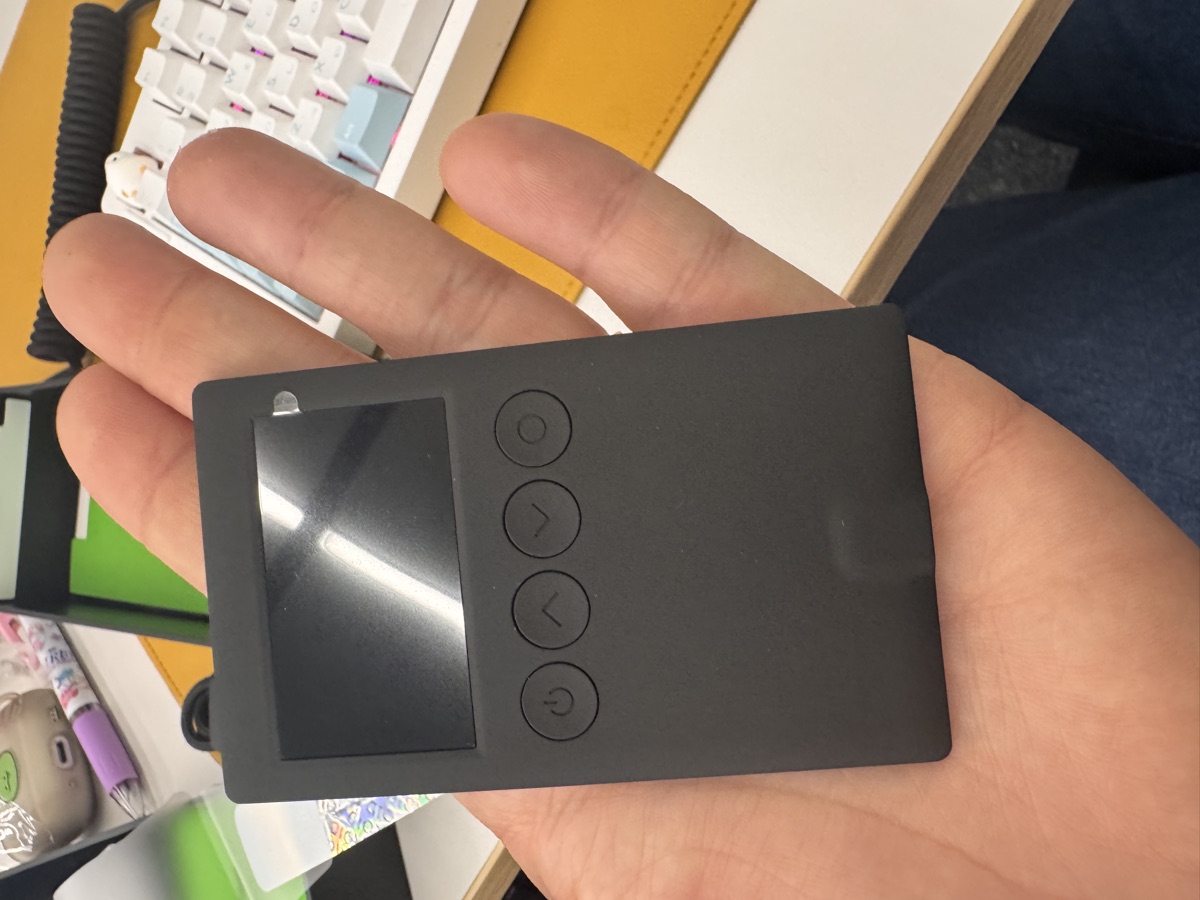
OneKey Classic 1S — $99
This is what I switched to after FTX. It’s co-branded by Binance, OKX, Bybit, and Bitget — which sounds like marketing fluff until you realize those exchanges literally distribute this hardware to institutional clients.
Specs:
– EAL6+ secure element (same certification as passports and credit cards)
– Bluetooth + USB-C
– 100+ chains, 30,000+ tokens
– Open-source firmware (you can audit the code)
– Air-gapped signing option via QR codes
The Bluetooth feature is controversial in the hardware wallet community, but OneKey implements it correctly: private keys never leave the secure element, even during wireless transactions. The app just sends unsigned transaction data, the device signs it offline, then sends back the signature.
You can grab it with a 10% discount here: https://onekey.so/r/FLUVPB/shop
OneKey Classic 1S Pure — $1,2000
Same EAL6+ chip, same firmware, but stripped down:
– No battery (USB-C only)
– No Bluetooth
– Wired transactions only
If you’re paranoid about wireless attack vectors (fair), this is the safer pick. I keep one as a cold storage device — it literally never connects to Bluetooth, only plugs in when I need to move funds.
Ledger Nano S Plus — $1,2001
Ledger has better brand recognition, but they’ve had concerning incidents:
– 2020 data breach exposed 270,000 customer addresses (physical safety risk)
– 2023 firmware update allowed optional key sharding (broke the “keys never leave device” promise)
The hardware is solid (EAL5+ secure element), but the trust model shifted. I can’t recommend them anymore.
What About the OneKey Pro?
If you’re managing serious money (5+ figures), the OneKey Pro ($1,2002) is worth it:
- 4x EAL6+ secure elements (quadruple redundancy)
- Fingerprint sensor (biometric unlock)
- 3.5″ color touchscreen (verify transaction details easily)
- Full air-gap mode (camera for QR signing, no USB/Bluetooth required)
I use this for long-term holdings. The air-gap QR workflow is paranoia-level secure: your seed phrase is generated offline, transactions are signed by scanning QR codes from your phone, and the device has never touched a computer.
Not necessary for most people, but if you’re holding through the next bull run, the peace of mind is worth $1,2003.
The Real Cost of Convenience
Exchanges are easier. I get it. One login, instant trades, yield farming options. But convenience has a price:
- Regulatory seizure risk: Governments can freeze exchange accounts. They can’t freeze your hardware wallet.
- Rehypothecation: Your staked ETH might be lent out 3x (see Celsius). With self-custody staking, your validator keys are yours.
- KYC data breach: Every exchange has your ID, address, and transaction history. Hardware wallets have none of it.
I still use exchanges for trading, but I follow a simple rule: never keep more on an exchange than you’d be willing to lose in a poker game. Everything else goes to cold storage within 24 hours.
How I Actually Use Mine
My setup:
- OneKey Classic 1S: Hot wallet for DeFi, NFTs, daily transactions. Bluetooth to my phone, quick approval workflow.
- OneKey Classic 1S Pure: Warm storage. Holds ~30% of portfolio. Plugs into my laptop once a month to rebalance.
- OneKey Pro: Cold storage. Air-gapped, fingerprint-locked, lives in a safe. Only touched during major bull/bear moves.
Seed phrases are split across two locations (half in safe deposit box, half in fireproof home safe). If my apartment burns down, I can still recover.
FAQ
Q: Can’t I just use a software wallet like MetaMask?
You can, but your private keys live on your computer/phone. Malware can steal them. A hardware wallet keeps keys in a tamper-resistant chip. The device has to physically confirm every transaction — no silent approvals.
Q: What if I lose the hardware wallet?
Your crypto isn’t stored on the device — it’s on the blockchain. The hardware wallet just holds the keys. If you lose it, buy another one and restore from your seed phrase. This is why seed phrase backup is critical (write it on metal, never store digitally).
Q: Are hardware wallets safe from the $1,2004 wrench attack?
No physical security protects against coercion. If someone knows you have crypto and is willing to threaten you, a hardware wallet won’t save you. Use a passphrase (25th word) for plausible deniability: show the attacker a decoy wallet with small amounts, keep the real funds in the passphrase-protected wallet.
The Bottom Line
Self-custody isn’t optional anymore — it’s the only model that survived the 2022 contagion. If you’re holding crypto you can’t afford to lose, get it off exchanges.
My recommendation: start with the OneKey Classic 1S Pure ($1,2005). It’s cheap enough to experiment with, secure enough to trust, and forces good habits (no wireless shortcuts). Once you’re comfortable with seed phrases and transaction signing, upgrade to the Classic 1S ($1,2006) for Bluetooth convenience or the Pro ($1,2007) for air-gapped cold storage.
You can get 10% off any OneKey device here: https://onekey.so/r/FLUVPB/shop
The best time to move to self-custody was before FTX collapsed. The second-best time is now.
🔐 Get 10% off OneKey — readers-only link
The link below auto-applies a 10% discount at checkout. Free worldwide shipping on orders over $1,2008.
Disclosure: This post contains affiliate links. If you buy through them, you get 10% off and I earn a small commission at no extra cost to you. I only recommend products I actually use.
Did you find this helpful?
Your support keeps this blog running and ad-free content coming.
☕ Buy me a coffeeMost Popular Posts
- Custom Metaclass in Python: 43% Faster Validation (12,954 views)
- yfinance Alternatives 2026: 7 Free APIs Compared (1,044 views)
- Python match-case: 7 Patterns That Beat if-elif Chains (982 views)
- YOLOv8 INT8 Quantization: 4x Faster on Jetson Orin (897 views)
- PaddleOCR vs EasyOCR vs Tesseract: Why PaddleOCR Is Slower (704 views)